
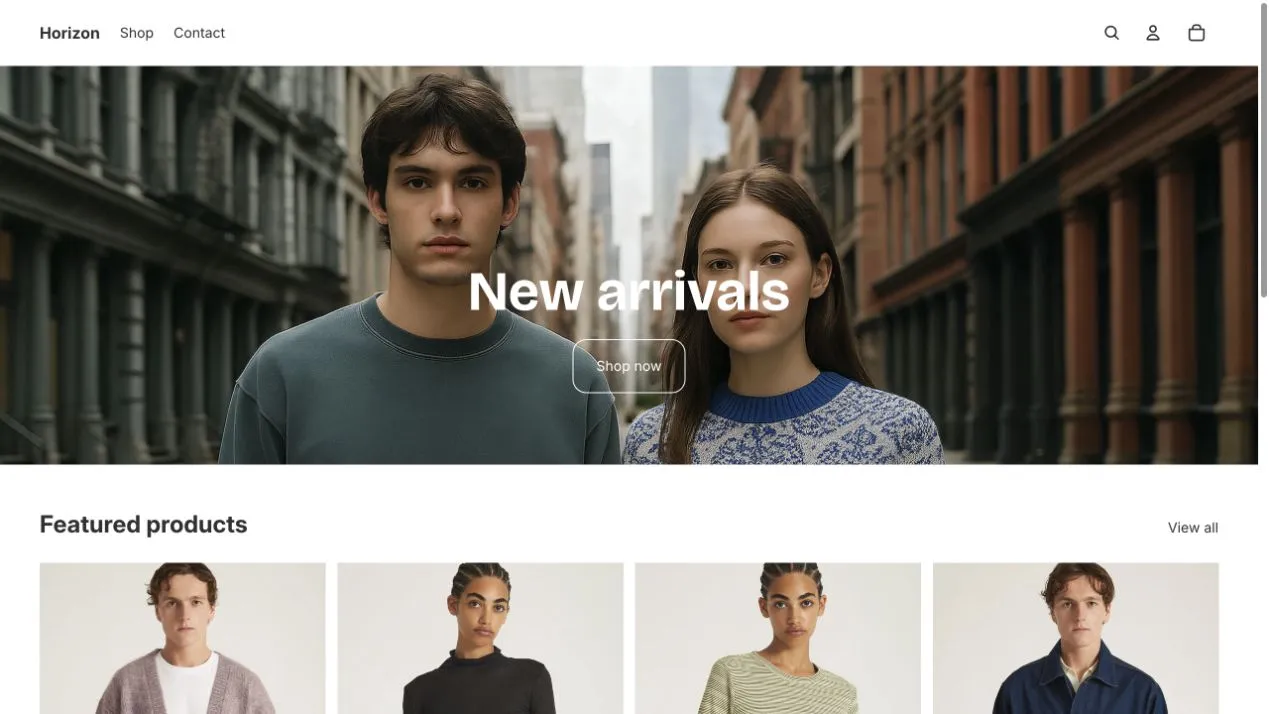
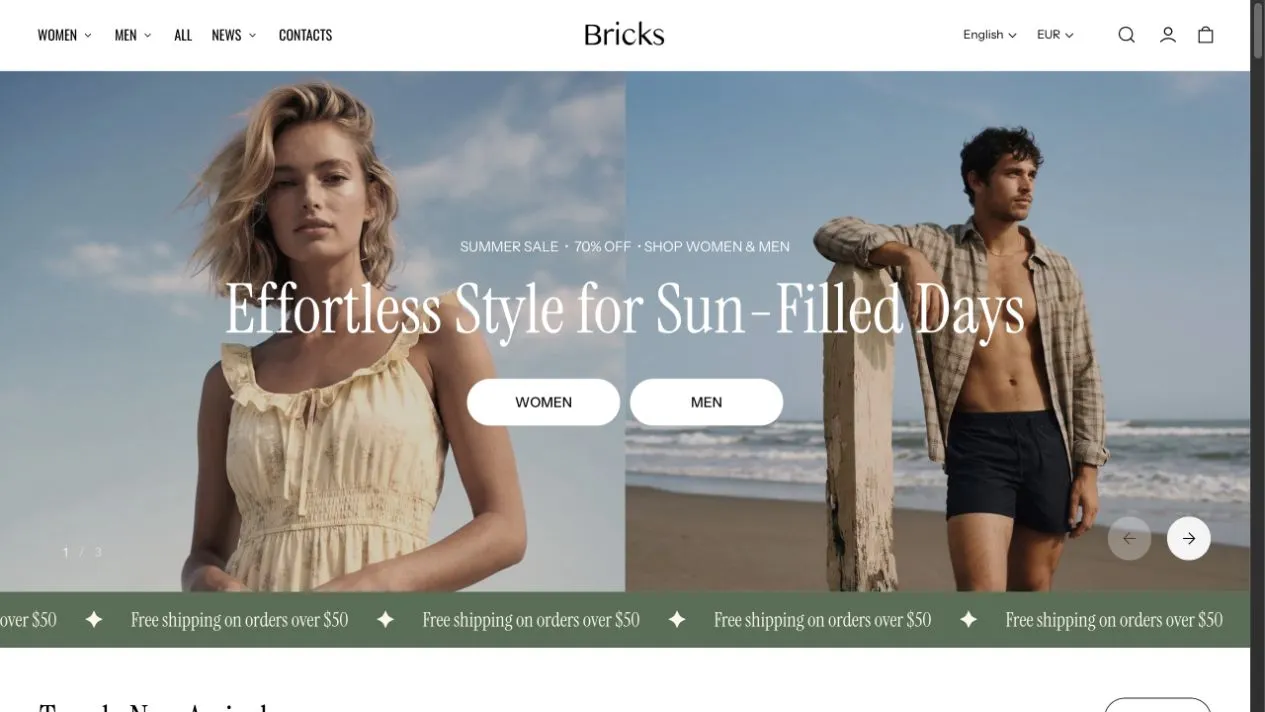
Choosing a Shopify theme today means comparing more than ready-made designs. The Horizon Shopify theme introduced flexible nested theme blocks to Shopify’s free theme lineup, and new paid themes now offer the same architecture. So, when considering a paid Horizon alternative, the question is what additional design controls, shopping features, and promotional tools you get beyond that shared foundation.
Bricks is a paid Shopify theme built around product showcasing and visual storytelling. Like Horizon, it uses nested blocks. It extends that approach with more reusable layout blocks, detailed styling and mobile controls, and built-in tools for promotions and cart recommendations.
The choice depends on how you want your store to work. A straightforward catalog may need little beyond Horizon’s existing layouts. A store that regularly builds campaign pages, shoppable stories, and cross-selling experiences has more reasons to consider Bricks.
This Horizon vs Bricks comparison covers Bricks 2.2.0 and Horizon 4.3.0, with pricing checked on October 20, 2026. See the Bricks Theme Store listing for current pricing and details.
The short answer
Bricks is the stronger choice if you want mixed-content layouts, detailed mobile customization, and built-in tools for promotions and cart recommendations. Its reusable blocks let you combine countdowns, product cards, and editorial content, while independently configured quick view and recommendations for individual cart items extend the shopping experience beyond the product page. Bricks’s regular price is $300; the promotional price was $150 when checked.
Horizon covers many of the same core design and product-page needs without a theme purchase cost. It is a practical choice when its existing layouts, styling controls, and merchandising features cover your requirements. For stores that need more flexible compositions, targeted promotional popups, and recommendations inside the cart drawer, Bricks brings those capabilities together in the theme.
Horizon vs Bricks at a glance
| Features | Bricks | Horizon |
|---|---|---|
| Theme price | $300 regular price; $150 promotional price checked October 20, 2026 | Free |
| Nested layouts | Nested groups, grid and carousel layouts, editorial layouts, and collages; supported child blocks depend on the container. | Groups, carousel sections, and accordion layouts |
| Starting designs | 60+ section presets and 50+ reusable blocks, with availability depending on context | Presets for product, collection, editorial, and other sections |
| Individual block styling | Detailed spacing, dimensions, backgrounds, shadows, typography, and animations. | Layout and styling controls vary by block. |
| Mobile customization | Separate settings across most sections and blocks. | Selected mobile controls, including stacking, widths, and media. |
| Product galleries | 16 grid and carousel layouts, with separate desktop and mobile selections. | Grid and carousel layouts |
| Sticky add to cart | Bar and compact-card layouts, plus a mobile preset | Responsive sticky bar |
| Linking separate products | Built-in product linking without Plus; other options reset when switching. Also supports Shopify Combined Listings | Shopify Combined Listings compatibility; Shopify’s app requires Plus or an enterprise commerce plan |
| Cart recommendations | Drawer and cart page, including recommendations for individual items | No built-in recommendation area in the cart drawer |
| Recently viewed products | Dedicated section, blocks for cart drawer and cart page | Block for predictive search |
| Product bundles | Merchant-defined sets with variant selection; add available items together. Discounts configured separately. | No equivalent built-in add-all bundle section. |
| Promotional tools | Reusable countdowns, targeted popups with time delay, scroll depth and exit intent, and three metafield-driven custom badges | Promotional content and click-triggered popups |
| Before-and-after and hotspots | Before-and-after blocks and image hotspots, with mixed-content layouts and shoppable media cards | Before-and-after blocks and image hotspots |
| Quick view | Independently configurable quick-add modal or drawer, with separate media and mobile settings | Quick-add modal with fixed content derived from the product page |
| Pagination | Infinite scroll, load more, or page links; separate device settings | Infinite scroll or page links |
| Mega-menu content | Featured products, collections, blog posts, and mixed promotional content | Collection imagery, featured products, and featured collections |
Section presets are ready-made starting arrangements, while blocks are the elements used to build them. Counts across themes are not directly comparable unless the same counting method is used.
Horizon vs Bricks pricing
Bricks’s regular price is $300, with a promotional price of $150 when checked for this article. Horizon is free. The purchase price is only part of the comparison: when choosing a paid vs free Shopify theme, consider what else you would need to build your intended storefront.
For example, a seasonal campaign might require a coordinated offer across banners, product cards, and the cart, with a different arrangement on mobile. Bricks provides built-in controls for many of these tasks. With Horizon, check which requirements its settings cover and whether the remaining work would require an app or paid customization.
Some costs may apply with either theme. Collecting customer reviews, displaying social feeds, and running specialized marketing workflows can still require separate tools.
Before buying, list the changes you expect to make over the next few months and try them in the theme editor. Compare the theme price together with any additional subscriptions or development work needed to achieve the same result.
VerdictBricks is worth paying for when its built-in capabilities cover work you would otherwise need to source separately. Horizon’s free price is a clear advantage when you can build the storefront you need with its existing features.
Layout flexibility
Both themes support Shopify theme blocks, letting you build beyond a fixed sequence of images, headings, and buttons. The difference is how many layout containers you can work with and what you can place inside them.
Bricks offers reusable grids, carousels, marquees, and collages, with supported child blocks varying by container. A skincare campaign, for example, could place several before-and-after comparisons alongside relevant products, an explanatory video, and a promotion countdown. These elements can form one composition instead of occupying separate full-width sections.
Horizon also includes nested groups, ready-made compositions, and a before-and-after comparison block. Bricks’s advantage is the additional ways to arrange and combine that content. Marquees illustrate the distinction: Horizon supports text, icons, logos, and dividers, while Bricks can also include a countdown that scrolls with the offer.
To help you get started, Bricks provides 60+ section presets, including 17 editorial and 15 product presets, alongside 50+ reusable blocks. These give merchants starting points for product stories and promotional pages, with the flexibility to rearrange their contents.
Nested blocks in the Bricks editor alongside a storefront layout combining product cards, text, and lifestyle images.
Customize your theme with nested blocks →
VerdictChoose Bricks when your campaign designs require more ways to combine content within a section. Horizon is a suitable choice when its existing containers and compositions cover your design requirements.
Styling and mobile controls
Individual styling and global presets
Bricks provides detailed per-block controls for padding, margins, dimensions, typography, backgrounds, borders, corners, shadows, and animations. Layout blocks also let you control the direction and gaps between their nested contents. As a result, a promotional card can have its own background and rounded corners, while the surrounding section keeps a simpler style.
General theme settings help establish consistent styles for elements such as buttons, badges, inputs, pills, and checkboxes. You can use those as style presets or customize individual elements.
Horizon also offers typography, borders, spacing, and layout settings. The available controls depend on the block, however, and it does not offer the same general system of individual margins, shadows, and animations. Bricks gives you more of these adjustments directly in the editor.
Mobile layouts and media
Most sections and blocks in Bricks offer separate mobile settings for relevant properties, including layout direction, alignment, gaps, dimensions, padding, and margins. Image and video banners also support separate mobile media.
For example, a desktop campaign might place a large image beside a narrow column of text and products. On mobile, you may want to stack the content, tighten the spacing, center the text, and choose an image better suited to a narrow screen.
Horizon also supports mobile adjustments, including stacking, widths, product-list presentation, gallery navigation, and separate mobile media in its Hero section. The difference is how widely those independent controls are available across sections and blocks.
The same Bricks section on desktop and mobile, showing different stacking, spacing, alignment, and image choices.
VerdictBricks is the stronger fit when you want to fine-tune individual elements and independently adjust the mobile presentation of most sections and blocks. Horizon suits designs that work within its block-specific styling and selected mobile controls.
Product pages
Both themes cover essential product-page functions, including media galleries, swatches, recommendations, and sticky add-to-cart functionality. Bricks adds more ready-made presentation choices and more control over supporting elements.
Galleries and sticky add to cart
Bricks offers 16 product-media gallery layouts: three carousel layouts and 13 grid layouts, with separate selections for desktop and mobile. For instance, a clothing store could display several product angles together on desktop and use a swipeable carousel on mobile.
Horizon provides grid and carousel galleries with settings such as column arrangements, thumbnails, navigation, and media behavior.
For sticky add to cart, Bricks offers a sticky bar, a compact card, and a separate mobile block; Horizon provides a responsive sticky bar. Both themes keep purchase controls available as shoppers scroll; Bricks offers more choice over their format and mobile presentation.
Bricks product galleries on desktop and mobile, with examples of the sticky add-to-cart bar and compact card.
Swatches, size charts, and supporting details
Bricks supports Shopify’s native swatches, its own swatch configuration, and variant images. It also lets merchants attach a chart to any product option, rather than treating charts exclusively as size guides. That can be useful for options such as fit, length, or dimensions, where shoppers need help interpreting the selection.
Horizon supports native swatches and variant images. It can also display guidance through content and popup blocks, though that is a different setup from a dedicated option-linked chart.
Linked products and combined listings
Bricks lets you connect separate products through a picker styled like a variant selector, with support for swatches. This built-in approach does not require Shopify Plus or the Combined Listings app.
A furniture brand, for example, can connect separate listings for different finishes, letting shoppers switch between them as if selecting variants, while each finish keeps its own product page.
Both Bricks and Horizon support Shopify’s Combined Listings app, which is available on Plus and enterprise commerce plans. Bricks’s own product-linking feature provides an additional option for stores outside those plans.
VerdictBricks offers more flexibility for tailoring product pages, from independent desktop and mobile gallery choices to option-linked charts and combined product listings without Plus. Horizon covers the core presentation needs and supports Shopify’s product-linking app for eligible stores.
Recommendations and bundles
Bricks extends product recommendations into the cart and lets shoppers add a predefined set of products together. Horizon supports product-page recommendations, with fewer built-in options for these cart and bundle interactions.
Product and cart recommendations
Bricks lets you show related and complementary products on product pages, in the cart drawer, and on the cart page. Cart recommendations can apply to the overall purchase or individual items. Even in their compact format, these blocks include quick-buy options, letting shoppers choose variants and add items to the cart without leaving the page.
You can configure related and complementary suggestions through Shopify Search & Discovery or use separate featured-product blocks to select products manually. An accessories store, for example, could recommend a compatible strap beside a bag in the cart, while a manually selected recommendation highlights a seasonal collection’s newest arrival.
Horizon also supports related and complementary recommendations on product pages. Its cart-page template can accommodate additional content, but its cart drawer has no equivalent built-in recommendation area.
Bricks cart drawer with related products, recommendations for an individual cart item, and quick-buy controls.
Recently viewed products
Bricks provides a dedicated recently viewed section, plus placements in the cart drawer and on the cart page. These let shoppers return to products they considered earlier, including while reviewing their purchase. Horizon displays recently viewed products only in predictive search.
Product bundles and discounts
Bricks lets you present a merchant-defined set of products that shoppers can add together with one button. Customers can select an available variant for each product before adding the available items.
As a result, a pet accessories store could offer a matching collar and leash, allowing shoppers to choose the size and color of each. The bundle can also link its products to hotspots on a shared image, showing how the items work together.
Horizon has no equivalent built-in add-all bundle section. Stores that need this purchase flow would need an app or customization.
A Bricks product bundle with variant selectors, product hotspots on a shared image, and one button to add the available items.
VerdictChoose Bricks when you want to suggest relevant additions during cart review and let customers purchase coordinated product sets together. Horizon covers product-page recommendations when these additional shopping flows are not required.
Promotional tools and popups
Bricks lets you display promotional messages throughout the storefront and show popups on selected pages based on visitor behavior.
Countdowns and custom badges
Bricks lets you add countdowns to banners, cards, bars, and marquees. A seasonal promotion, for example, could pair an announcement with a scrolling timer or display the deadline beside featured products.
Alongside sale and sold-out badges, Bricks supports three custom badges with content drawn from product metafields. You can label products “Limited edition,” “New arrival,” or “Bestseller,” managing the wording through custom data.
Horizon includes sale and sold-out badges, but it has no equivalent built-in countdown block or dedicated system of custom product badges.
A Bricks promotional section combining a fashion image, a product card, a countdown timer, and scrolling discount messages.
Popup triggers and targeting
Bricks provides five popup presets for email signup, age verification, promotions, and limited-time offers. Popups can appear immediately, after a delay, at a chosen scroll depth, or on desktop exit intent. Page targeting lets you select page types or specific page paths. Frequency settings let you show a popup once per browser session, at timed intervals, or only once in that browser. For example, Bricks can show a signup offer on selected pages after a visitor has scrolled, while controlling how often it reappears.
Horizon includes a popup-link block that opens content when clicked. It is useful for information a shopper deliberately requests, but it is not the same as an automatically triggered promotional popup.
A Bricks promotional popup on a storefront, accompanied by its trigger, page-targeting, and frequency settings.
VerdictBricks is the better choice for stores that want to coordinate timed offers, product labels, and targeted popups using built-in tools. Horizon covers standard sale badges and informational popups shoppers open themselves.
Visual storytelling
Both Bricks and Horizon support before-and-after comparisons and image hotspots. These shared features let merchants illustrate a product’s results or connect parts of an image to products.
Bricks lets merchants combine before-and-after comparisons with product cards, countdowns, and other content inside larger layouts. For example, a Bricks collage can contain several comparisons alongside products and promotional content, rather than presenting each comparison as an isolated section.
Shoppable images and videos
Bricks also includes shoppable media cards that combine an image or video with an overlaid product card. Each card features one selected product and supports separate images or videos for desktop and mobile.
A homeware brand could create a series of short demonstrations, each paired with a product card for purchasing. A beauty brand could place a shoppable tutorial beside before-and-after comparisons, connecting the demonstration with its results.
The compact product cards also support quick-buy options, letting shoppers choose variants and add items to the cart without leaving the page.
Horizon includes video blocks and product hotspots on images, but it has no equivalent shoppable videos with overlaid product cards.
Bricks shoppable images and videos with overlaid product cards and quick-buy controls.
VerdictBricks is the stronger fit for stores that need multiple comparisons inside mixed-content compositions or videos with overlaid product cards. Horizon already covers before-and-after comparisons and image hotspots when those interactions are sufficient.
Performance and accessibility
Performance and accessibility are also important considerations when choosing a theme. We tested Bricks 2.2.0 and Horizon 4.3.0 using Lighthouse in Chrome DevTools. Both themes scored 99 for desktop performance. Horizon scored higher for mobile performance and automated accessibility in the recorded tests.
Test setup
We prepared the store and product catalog using Shopify’s benchmark setup guidance, then built homepages with 12 sections covering similar content: a hero, two product lists, a split showcase, blog posts, image with text, icons with text, a slideshow, a before-and-after comparison, an FAQ, a marquee, and email signup.
Each theme retained its existing header and footer groups. Bricks also retained its cart drawer, search drawer, and quick view. Both themes were tested in Chrome Incognito with the same Lighthouse settings.
The pages used placeholder media rather than uploaded brand images or videos. This reduced the influence of media choices, allowing a closer comparison of the configured themes. The layouts were comparable, but their underlying components and default settings were not identical.
| Lighthouse score | Bricks homepage | Horizon homepage |
|---|---|---|
| Desktop performance | 99 | 99 |
| Mobile performance | 84 | 95 |
| Desktop accessibility | 89 | 99 |
| Mobile accessibility | 89 | 99 |
Bricks results
Bricks matched Horizon’s desktop performance score while retaining its additional shopping interfaces. On mobile, Horizon led by 11 points.
Bricks’s broader range of layout controls and shopping components may help explain the mobile difference. More complex components can involve additional markup and styling, whose processing costs can become more noticeable under mobile test conditions. Separate mobile layouts change how content is presented, but do not necessarily remove the work needed to load and initialize those components. This is a possible explanation; the overall scores do not establish the cause.
Horizon results
Horizon scored 99 for automated accessibility on both devices, compared with Bricks’s 89. More complex interfaces can create additional accessibility requirements, but feature richness alone does not explain or justify a lower score. Neither score replaces manual keyboard and screen-reader testing.
The placeholder setup also matters when interpreting performance. It provides a baseline before adding brand media, but does not isolate theme code completely. Product photography, video, apps, tracking scripts, and customizations can all change a finished store’s results.
For merchants, the useful comparison is how each theme performs with the layouts, content, and shopping features the store actually needs. These results offer a starting point, rather than a guarantee for every page or configuration.
VerdictBoth themes delivered the same desktop performance score in this test. Horizon had the stronger mobile performance and automated accessibility results. Bricks offers broader built-in design and merchandising options, but the available data cannot establish whether those capabilities caused the measured differences.
Horizon or Bricks: what suits your store best?
Switch from Horizon to Bricks when you can identify specific storefront requirements that Horizon’s existing controls do not cover.
Good reasons include needing richer mixed-content layouts, cart-drawer recommendations, more independent mobile styling, or promotional tools that you currently cannot configure through your theme.
Before switching, build a representative product page, collection page, campaign section, and mobile navigation experience in the unpublished theme. Check your actual products, media, apps, and purchase flows.
Pay particular attention to theme-specific layouts and settings. Treat the move as a storefront implementation, with time allocated to rebuilding and checking the experience.
Horizon remains a reasonable choice for a new business keeping its launch costs low or a merchant who prefers a smaller set of controls while learning nested blocks. It also includes features worth evaluating for particular catalogs, such as its quick order list.
Try Bricks with your own products
Build a product story, promotion, or mobile layout that matters to your store. Try the controls with your own content and see how much of your intended design you can create directly in the editor.
Common questions
Is Bricks worth paying for instead of using Horizon?
Yes, if you need its additional layout containers, independent mobile controls, and built-in merchandising tools. Bricks lets you combine editorial and promotional content, recommend products inside the cart, and run targeted popups within one theme. The purchase makes most sense when these capabilities cover work you would otherwise need an app or customization to achieve. Horizon remains a practical free option when its existing features meet your needs.
Do both Horizon and Bricks support nested blocks?
Yes. Both themes support Shopify nested blocks, so you can arrange content within groups rather than rely only on fixed section layouts. Bricks extends that foundation with additional containers and broader styling controls, giving you more ways to combine products, media, text, and promotions within a section.
Can Horizon or Bricks replace Shopify apps?
No theme can fully replace all apps, especially those that handle complex workflows. Bricks includes countdowns, promotional popups, recently viewed products, and cart recommendations, so you may not need separate apps for those specific tasks. Collecting reviews, displaying social feeds, and running email automations still require dedicated tools.
Which theme can display combined listings without Shopify Plus?
Bricks provides a built-in combined listing feature that lets shoppers switch between separate products as if choosing variants, including through swatches. Each product retains its own page and remains a separate item in collection listings. This feature does not require Shopify Plus or Shopify’s Combined Listings app. Horizon has no equivalent built-in feature.
Does Horizon or Bricks include product bundles?
Bricks includes a dedicated bundle section. Shoppers can choose available variants and add the available products together with one button. Each configured product entry adds one unit, and sold-out products are excluded from that action. Horizon has no equivalent built-in section.
Which theme is faster, Horizon or Bricks?
Horizon had the higher mobile performance score in our Lighthouse homepage tests: 95 versus Bricks’s 84. Both themes scored 99 on desktop. We tested Bricks 2.2.0 and Horizon 4.3.0 using comparable 12-section homepages with placeholder media, Chrome Incognito, and the same Lighthouse settings. These results apply to the tested configurations; your media, apps, and customizations can change how either theme performs.